
Kindly note that NADRA has fully functional Pak ID Mobile App on IOS and Android platforms for NICOP/CNIC, POC and FRC applications. In order to facilitate Pakistanis and Pakistani-Americans living in the States under consular jurisdiction of this Mission, a link to the website, a snapshot on how to apply, timelines and procedures along with an elaborate NADRA’s Customer Care resources are shared hereunder.
Find out more on website (https://www.nadra.gov.pk/national-identity-card-for-overseas-pakistanis-nicop/)
Apply exclusively through Pak ID Mobile App available on Apple Store and Google Play.
Pakistan-Identity cards are fully online through NADRA system. Here, you can apply online for your Pakistan ID Card and have it delivered to your doorstep.
The online application process at Pak-Identity can be completed in 3 Quick Steps.
Before starting your application, please read through the instructions for each step below:
Step 1: Preliminary Assessment
- Understand your requirement and then choose the appropriate category to apply in. Currently, the following categories are available:
- Figure out:
- the Application Fee (https://id.nadra.gov.pk/fee/ ) that you will have to pay for your chosen category
- the Supporting Documents (https://id.nadra.gov.pk/faq/ ) that you will have to upload for your chosen category
Step 2: Preparation
- Once you know what supporting documents are required, prepare them before applying at Pak-Identity
- Have your portrait photograph captured as explained in the Photograph Tutorial(https://id.nadra.gov.pk/docs/PhotoGuidelines.pdf )
- Have a valid Credit Card/Debit Card ready for online payment of your application fee.
Step 3: Online Application at Pak-Identity
You are now ready to apply online at Pak-Identity.
Now, you have to:
- Click on the green Get Started button at the top to launch the Pak-Identity Application System
- Register your account there
- Create an application in the appropriate category
- Provide your address for card delivery
- Pay Fee through a Credit Card/Debit Card.
- Provide details for the following:
- Personal
- Spouse / Parents
- Relatives
- Scan and upload your photograph
- Scan and upload the supporting documents
- Download and print the special fingerprint form on A4/Letter page size.
- Capture your fingerprints on this form with the help of the Fingerprint Tutorial (https://id.nadra.gov.pk/docs/FingerprintGuidelines.pdf) .
- Scan and upload the fingerprint form
- Scan quality must be a minimum of 600 dpi in Grayscale
- Download and fill the attester form. You have to:
- Have the form attested if you are applying from Pakistan
- Provide details of two witnesses if you are applying from outside Pakistan. Each witness must be a valid NICOP holder
- Scan and upload the attester form.
- Review the information you provided and sign the declaration.
NOTE: If the chosen category is New Overseas ID or Reprint, then the payment is received at the end of the application. In other categories, the payment will have to be made at the start of the application.
How long will the Online Application Process take?
The online application process differs for each category you apply in. The following table shows the approximate time take to complete an online application, assuming that you fulfill all the prerequisites.
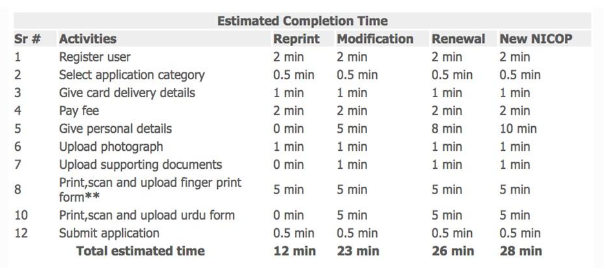
** Finger print form is not required in case card delivery address is same as of your ID Card present or permanent address.
Processing and Delivery Times
We aim to process the submitted applications and ship the cards as per the time frames detailed below. Actual processing times will vary for each case depending on a range of factors.
NOTE:
- Processing Time of an application starts after successful submission by an applicant.
- Delivery Time of a card starts upon hand-over to courier service for delivery.
- Missing Documentation will result in longer processing times.
ESTIMATED TIMELINES
Application Stage |
Minimum Time Required |
Application Processing |
7 working days |
Local Shipping in Pakistan |
2 working days |
International Shipping |
5 working days |